
Display Logic Rules for Electronic Resources
Last edit September 30, 2026.
Background
Display Logic Rules control the conditions for display of Alma Services in Primo VE's Get It and View It sections. They are configured on the Discovery Interface Display Logic page in Alma Configuration > Fulfillment > Discovery Interface Display Logic > Display Logic Rules. This page contains some optional recipes for controlling the presentation of e-Collections with DLRs that I-Share institutions may choose to configure.
To configure DLRs for Primo VE, you must have one of these Alma user roles:
- General System Administrator
- Fulfillment Administrator
Page Contents
Related Documentation
EBSCO e-collection recipes
How to Hide One e-Collection When a Specific e-Collection is Available
Other Options and Examples
Related Documentation
Clarivate documentation
In the complete Clarivate documentation on DLRs, you can read how to Add Display Logic Rules for Primo VE.
CARLI documentation
CARLI-required Display Logic Rules for I-Share Institutions - Information only. These rules are in place in all I-Share Alma instances and were created by CARLI and Clarivate staff.
I-Share Display Logic Rules Recipes for Requesting in Primo VE - Optional recipes for controlling the presentation of local and I-Share request links with Display Logic Rules.
EBSCO Recipes
The following recipes are what was used in the Network Zone previously. When EBSCO e-collections provided by CARLI and by the State of Illinois were active in the NZ and shared centrally to the IZs. You can use this template as is or tweak to meet your own institution's needs. Some of the e-collections listed in the "Hide service Full Text with Electronic collection" may not be active in your IZ and will not apply.
You can also prioritize any database upgrade subscriptions in the DLRs. For example, if your institution pays for Business Source Ultimate you would want this to display in Primo VE, instead of Business Source Premier provided by CARLI.
For each rule (row) below the following fields will remain the same:
For user from groups - blank/nothing typed here -
Hide service full text
with electronic collection
if service exists full text
with electronic collection
The values shared below will be input into the with value* fields. The electronic collections listed in the "Hide service Full Text with Electronic collection" will be input into the first with value* field and the one electronic collection listed in the "If exists service Full Text with Electronic collection" will be input into the second or bottom with value* field.
ROW 1
Hide service Full Text with Electronic collection = EBSCOhost Consumer Health Reference Center EBSCOhost Alt HealthWatch EBSCOhost Middle Search Plus EBSCOhost Primary Search EBSCOhost Middle Search Reference eBook Collection EBSCOhost LGBTQ+ Source EBSCOhost Literary Reference eBooks EBSCOhost MasterFILE eBooks EBSCOhost MasterFILE Complete EBSCOhost Science Reference Center eBook Collection EBSCOhost Humanities Source Ultimate EBSCOhost Psychology & Behavioral Science EBSCOhost MAS eBooks EBSCOhost Ethnic Diversity Source EBSCOhost Regional Business News EBSCOhost Biography Reference Center eBook Subscription EBSCOhost Business Source Premier EBSCOhost MAS Complete EBSCOhost Military and Government Collection EBSCOhost Professional Development Collection EBSCOhost Library & Information Science Source EBSCOhost Legal Information Source EBSCOhost Health Source Nursing Academic Edition EBSCOhost Legal Source EBSCOhost Primary Search Reference eBook Subscription EBSCOhost Constumer Health Journals & Booklets EBSCOhost Health Source Consumer Edition EBSCOhost Literary Reference Center EBSCOhost Newspapers Plus
If exists service Full Text with Electronic collection = EBSCOhost Academic Search Complete
ROW 2
Hide service Full Text with Electronic collection = EBSCOhost Consumer Health Reference Center EBSCOhost Alt HealthWatch EBSCOhost Middle Search Plus EBSCOhost Primary Search EBSCOhost Middle Search Reference eBook Collection EBSCOhost LGBTQ+ Source EBSCOhost MasterFILE eBooks EBSCOhost MasterFILE Complete EBSCOhost Science Reference Center eBook Collection EBSCOhost Humanities Source Ultimate EBSCOhost Psychology & Behavioral Science EBSCOhost MAS eBooks EBSCOhost Ethnic Diversity Source EBSCOhost Regional Business News EBSCOhost Biography Reference Center eBook Subscription EBSCOhost MAS Complete EBSCOhost History Reference Source EBSCOhost Military and Government Collection EBSCOhost Professional Development Collection EBSCOhost Library & Information Science Source EBSCOhost Legal Information Source EBSCOhost Health Source Nursing Academic Edition EBSCOhost Legal Source EBSCOhost Primary Search Reference eBook Subscription EBSCOhost Consumer Health Journals & Booklets EBSCOhost Health Source Consumer Edition EBSCOhost History Reference Center eBook Collection EBSCOhost Literary Reference Center EBSCOhost Newspapers Plus
If exists service Full Text with Electronic collection = EBSCOhost Business Source Premier
ROW 3
Hide service Full Text with Electronic collection = EBSCOhost Consumer Health Reference Center EBSCOhost Middle Search Plus EBSCOhost Primary Search EBSCOhost Middle Search Reference eBook Collection EBSCOhost LGBTQ+ Source EBSCOhost Literary Reference eBooks EBSCOhost MasterFILE eBooks EBSCOhost MasterFILE Complete EBSCOhost Science Reference Center eBook Collection EBSCOhost Humanities Source Ultimate EBSCOhost Psychology & Behavioral Science EBSCOhost MAS eBooks EBSCOhost Ethnic Diversity Source EBSCOhost Regional Business News EBSCOhost MAS Complete EBSCOhost History Reference Source EBSCOhost Military and Government Collection, EBSCOhost Professional Development Collection EBSCOhost Library & Information Science Source EBSCOhost Legal Information Source EBSCOhost Primary Search Reference eBook Subscription EBSCOhost Legal Source EBSCOhost Consumer Health Journals & Booklets EBSCOhost Health Source Consumer Edition EBSCOhost History Reference Center eBook Collection EBSCOhost Literary Reference Center EBSCOhost Newspapers Plus
If exists service Full Text with Electronic collection = EBSCOhost Health Source Nursing Academic Edition
ROW 4
Hide service Full Text with Electronic collection = EBSCOhost Consumer Health Reference Center EBSCOhost Alt HealthWatch EBSCOhost Middle Search Plus EBSCOhost Primary Search EBSCOhost Middle Search Reference eBook Collection EBSCOhost LGBTQ+ Source EBSCOhost Literary Reference eBooks EBSCOhost Science Reference Center eBook Collection EBSCOhost Humanities Source Ultimate EBSCOhost Psychology & Behavioral Science EBSCOhost MAS eBooks EBSCOhost Ethnic Diversity Source EBSCOhost Regional Business News EBSCOhost Biography Reference Center eBook Subscription EBSCOhost MAS Complete EBSCOhost History Reference Source EBSCOhost Military and Government Collection EBSCOhost Professional Development Collection EBSCOhost Library & Information Science Source EBSCOhost Legal Information Source EBSCOhost Legal Source EBSCOhost Primary Search Reference eBook Subscription EBSCOhost Consumer Health Journals & Booklets EBSCOhost History Reference Center eBook Collection EBSCOhost Literary Reference Center EBSCOhost Newspapers Plus
If exists service Full Text with Electronic collection = EBSCOhost MasterFILE Complete
ROW 5
Hide service Full Text with Electronic collection = EBSCOhost Consumer Health Reference Center EBSCOhost Alt HealthWatch EBSCOhost Middle Search Plus EBSCOhost Primary Search EBSCOhost Middle Search Reference eBook Collection EBSCOhost LGBTQ+ Source EBSCOhost Literary Reference eBooks EBSCOhost Science Reference Center eBook Collection EBSCOhost Humanities Source Ultimate, EBSCOhost Psychology & Behavioral Science EBSCOhost MAS eBooks EBSCOhost Ethnic Diversity Source EBSCOhost Regional Business News EBSCOhost Biography Reference Center eBook Subscription EBSCOhost History Reference Source EBSCOhost Military and Government Collection EBSCOhost Professional Development Collection EBSCOhost Library & Information Science Source EBSCOhost Legal Information Source EBSCOhost Legal Source EBSCOhost Primary Search Reference eBook Subscription EBSCOhost Consumer Health Journals & Booklets EBSCOhost History Reference Center eBook Collection EBSCOhost Literary Reference Center EBSCOhost Newspapers Plus
If exists service Full Text with Electronic collection = EBSCOhost MAS Complete
ROW 6
Hide service Full Text with Electronic collection = EBSCOhost Regional Business News EBSCOhost Biography Reference Center eBook Subscription EBSCOhost Alt HealthWatch EBSCOhost Middle Search Plus EBSCOhost Primary Search EBSCOhost Middle Search Reference eBook Collection EBSCOhost History Reference Source EBSCOhost LGBTQ+ Source EBSCOhost MasterFILE eBooks EBSCOhost Professional Development Collection EBSCOhost Library & Information Science Source EBSCOhost Legal Information Source EBSCOhost Legal Source EBSCOhost Primary Search Reference eBook Subscription EBSCOhost Consumer Health Journals & Booklets EBSCOhost Science Reference Center eBook Collection EBSCOhost Humanities Source Ultimate EBSCOhost Psychology & Behavioral Science EBSCOhost MAS eBooks EBSCOhost History Reference Center eBook Collection EBSCOhost Newspapers Plus
If exists service Full Text with Electronic collection = EBSCOhost Military and Government Collection
ROW 7
Hide service Full Text with Electronic collection = EBSCOhost Regional Business News EBSCOhost Biography Reference Center eBook Subscription EBSCOhost Alt HealthWatch EBSCOhost Middle Search Plus EBSCOhost Primary Search EBSCOhost Middle Search Reference eBook Collection EBSCOhost History Reference Source EBSCOhost LGBTQ+ Source EBSCOhost MasterFILE eBooks EBSCOhost Professional Development Collection EBSCOhost Library & Information Science Source EBSCOhost Legal Information Source EBSCOhost Primary Search Reference eBook Subscription EBSCOhost Legal Source EBSCOhost Consumer Health Journals & Booklets EBSCOhost Science Reference Center eBook Collection EBSCOhost Humanities Source Ultimate EBSCOhost Psychology & Behavioral Science EBSCOhost History Reference Center eBook Collection EBSCOhost MAS eBooks
If exists service Full Text with Electronic collection = EBSCOhost Newspapers Plus
ROW 8
Hide service Full Text with Electronic collection = EBSCOhost Regional Business News EBSCOhost Biography Reference Center eBook Subscription EBSCOhost Alt HealthWatch EBSCOhost Middle Search Plus EBSCOhost Middle Search Reference eBook Collection EBSCOhost History Reference Source EBSCOhost LGBTQ+ Source EBSCOhost MasterFILE eBooks EBSCOhost Professional Development Collection EBSCOhost Library & Information Science Source EBSCOhost Legal Information Source EBSCOhost Primary Search Reference eBook Subscription EBSCOhost Legal Source EBSCOhost Consumer Health Journals & Booklets EBSCOhost Science Reference Center eBook Collection EBSCOhost Humanities Source Ultimate EBSCOhost Psychology & Behavioral Science EBSCOhost MAS eBooks EBSCOhost History Reference Center eBook Collection
If exists service Full Text with Electronic collection = EBSCOhost Primary Search
ROW 9
Hide service Full Text with Electronic collection = EBSCOhost Regional Business News EBSCOhost Biography Reference Center eBook Subscription EBSCOhost Alt HealthWatch EBSCOhost Middle Search Plus EBSCOhost Middle Search Reference eBook Collection EBSCOhost History Reference Source EBSCOhost LGBTQ+ Source EBSCOhost MasterFILE eBooks EBSCOhost Library & Information Science Source EBSCOhost Legal Information Source EBSCOhost Primary Search Reference eBook Subscription EBSCOhost Legal Source EBSCOhost Consumer Health Journals & Booklets EBSCOhost Science Reference Center eBook Collection EBSCOhost Humanities Source Ultimate EBSCOhost Psychology & Behavioral Science EBSCOhost History Reference Center eBook Collection EBSCOhost MAS eBooks
If exists service Full Text with Electronic collection = EBSCOhost Professional Development Collection
ROW 10
Hide service Full Text with Electronic collection = EBSCOhost Biography Reference Center eBook Subscription EBSCOhost Alt HealthWatch EBSCOhost Middle Search Plus EBSCOhost Middle Search Reference eBook Collection EBSCOhost History Reference Source EBSCOhost LGBTQ+ Source EBSCOhost MasterFILE eBooks EBSCOhost Library & Information Science Source EBSCOhost Legal Information Source EBSCOhost Legal Source EBSCOhost Primary Search Reference eBook Subscription EBSCOhost Consumer Health Journals & Booklets EBSCOhost Science Reference Center eBook Collection EBSCOhost Humanities Source Ultimate EBSCOhost Psychology & Behavioral Science EBSCOhost History Reference Center eBook Collection EBSCOhost MAS eBooks
If exists service Full Text with Electronic collection = EBSCOhost Regional Business News
ROW 11
Hide service Full Text with Electronic collection = EBSCOhost Biography Reference Center eBook Subscription EBSCOhost Alt HealthWatch EBSCOhost Middle Search Plus EBSCOhost Middle Search Reference eBook Collection EBSCOhost History Reference Source EBSCOhost LGBTQ+ Source EBSCOhost MasterFILE eBooks EBSCOhost Library & Information Science Source EBSCOhost Legal Information Source EBSCOhost Legal Source EBSCOhost Primary Search Reference eBook Subscription EBSCOhost Consumer Health Journals & Booklets EBSCOhost Science Reference Center eBook Collection EBSCOhost Psychology & Behavioral Science EBSCOhost MAS eBooks EBSCOhost History Reference Center eBook Collection
If exists service Full Text with Electronic collection = EBSCOhost Humanities Source Ultimate
ROW 12
Hide service Full Text with Electronic collection = EBSCOhost eBook Subscription Diversity & Ethnic Studies EBSCOhost Biography Reference Center eBook Subscription EBSCOhost Consumer Health Reference Center EBSCOhost Alt HealthWatch EBSCOhost Middle Search Plus EBSCOhost Middle Search Reference eBook Collection EBSCOhost Ebook Business Collection EBSCOhost Ebook Subscription Cricket Media Collection (Provided by the Illinois Secretary of State/Illinois State Library) EBSCOhost LGBTQ+ Source EBSCOhost MasterFILE eBooks EBSCOhost Ebooks EBSCOhost Book Collection Nonfiction EBSCOhost Library & Information Science Source EBSCOhost Ebook Subscription K-8 Collection EBSCOhost Legal Information Source EBSCOhost eBook Public Library Collection North America EBSCOhost Ebook Subscription High School Collection EBSCOhost Legal Source EBSCOhost Primary Search Reference eBook Subscription EBSCOhost Science Reference Center eBook Collection EBSCOhost Psychology & Behavioral Science EBSCOhost Literary Reference Center EBSCOhost MAS eBooks EBSCOhost Ethnic Diversity Source
If exists service Full Text with Electronic collection = EBSCOhost Literary Reference eBooks
ROW 13
Hide service Full Text with Electronic collection = EBSCOhost eBook Subscription Diversity & Ethnic Studies EBSCOhost Biography Reference Center eBook Subscription EBSCOhost Consumer Health Reference Center EBSCOhost Alt HealthWatch EBSCOhost Middle Search Plus EBSCOhost Middle Search Reference eBook Collection EBSCOhost Ebook Business Collection EBSCOhost Ebook Subscription Cricket Media Collection (Provided by the Illinois Secretary of State/Illinois State Library), EBSCOhost LGBTQ+ Source EBSCOhost MasterFILE eBooks EBSCOhost Ebooks EBSCOhost Book Collection Nonfiction EBSCOhost Library & Information Science Source EBSCOhost Ebook Subscription K-8 Collection EBSCOhost Legal Information Source EBSCOhost eBook Public Library Collection North America EBSCOhost Ebook Subscription High School Collection EBSCOhost Legal Source EBSCOhost Primary Search Reference eBook Subscription EBSCOhost Science Reference Center eBook Collection EBSCOhost Literary Reference Center EBSCOhost MAS eBooks EBSCOhost Ethnic Diversity Source
If exists service Full Text with Electronic collection = EBSCOhost Psychology & Behavioral Science
How to Hide One e-Collection When a Specific e-Collection is Available
Goal: If a resource is in e-Collection X, don’t show links to e-Collection Y (or possibly several different e-Collections).
Why might you want to do this?
To give priority to X over Y. For example, e-Collection X may be lower cost than e-Collection Y, or e-Collection X may have better linking quality and reliability.
This recipe requires you to create one Display Logic Rule (DLR).
How to define the DLR
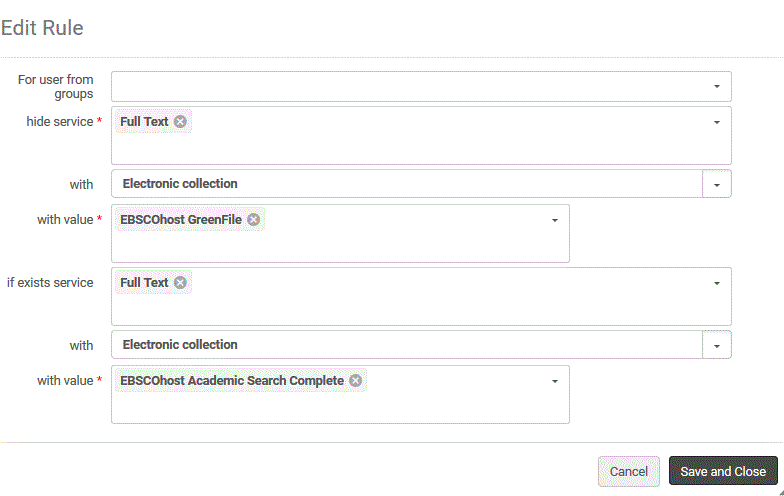
The Example Rule in the steps below will hide "EBSCOhost GreenFile" if the full text is available in "EBSCOhost Academic Search Complete."
For this example, you can refer to the image at the right for steps two through seven. It is a screenshot of the Add Rule pop-up screen in Alma with the following fields: For user from groups, hide service (with a red asterisk), with, and with value. The buttons at the bottom of the pop-up read: Add, Cancel, and Add and Close.
1. Go to Alma Configuration > Fulfillment > Discovery Interface Display Logic > Display Logic Rules.
2. Click on Add Rule to create a blank rule.
3. Click on the down arrow at the end of hide service* drop-down and select Full Text. This will populate more fields with drop-down menus below the hide service* field.
4. Click on the down arrow at the end of the with field and choose Electronic collection from the drop-down menu.
5. Then, click on the down arrow at end of the with value field. A list of activated e-Collections will display and you can select the one you want to hide. The image at right is a screenshot that shows the additional fields that populate.
6. Next, click on the down arrow at the end of if exists service field and select Full Text.
7. Then, click on the down arrow at the end of the with value field. A list of activated e-Collections will display and you can select the one you want to prioritize showing in the Primo VE delivery services display.
8. Confirm the rule has the values you intend. To the right of this text is an example screenshot of what an edited rule looks like with the previous example's selections being made:
9. When ready, click the Add and Close button. Note: If you are editing an existing rule, the button is labeled Save and Close. The Display Logic Rule is done.
Other Options and Examples
Option 1
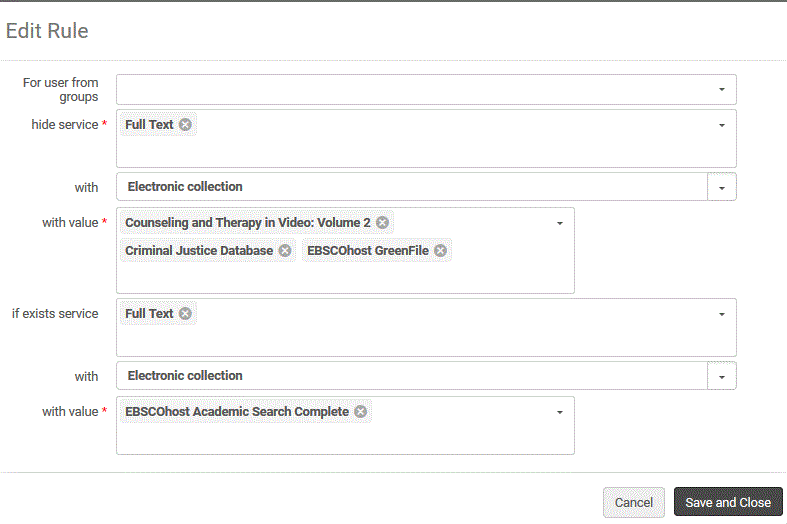
If desired, you can add multiple e-Collections to a rule. For example, the rule pictured below will hide "Counseling and Therapy in Video: Vol. 2," "Criminal Justice Database," and "EBSCOhost GreenFile" if the full text is available in "EBSCOhost Academic Search Complete." The image shows the following selections:
- The For user from groups field is empty.
- The hide service* field lists Full Text.
- The with field lists Electronic collection.
- The with value* field lists
- Counseling and Therapy in Video: Volume 2
- Criminal Justice Database
- EBSCOhost GreenFile.
- The if exists service field lists Full Text.
- The with field lists Electronic Collection.
- The with value* field lists EBSCOhost Academic Search Complete.
OPTION 2
Use the Interface option to hide a group of e-collections from the same vendor/interface company.
Just select Interface instead of Electronic collection in the with field for Full Text service.
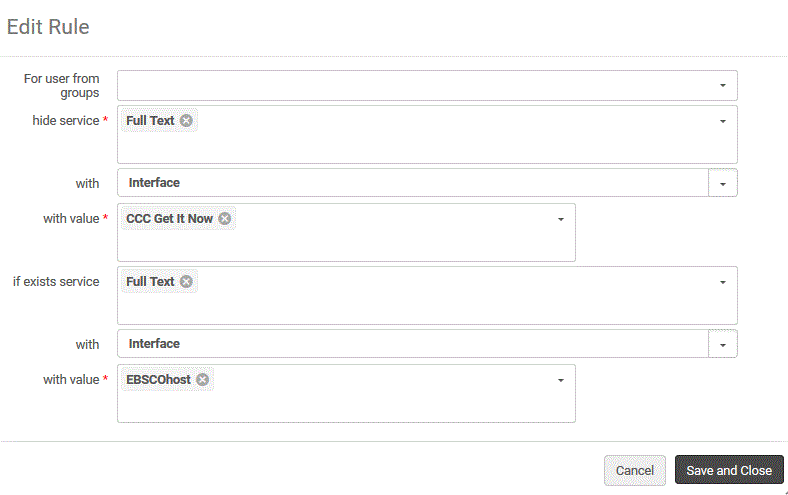
For example, the rule pictured to the right of this text means: If the resource is in any EBSCOhost Interface e-collection, don't show CCC Get it Now Interface e-Collections. This might be useful because CCC Get it Now from Copyright Clearance Center e-Collections are more costly than EBSCOhost. The following selections were made in the screenshot:
- For user from groups field is blank
- hide service* field lists Full Text
- with field lists Interface
- with value* field lists CCC Get It Now
- if exists service field lists Full Text
- with field lists Interface
- with value* field lists EBSCOhost
OPTION 3
You can also mix Electronic Collections and Interface variables. The rule pictured to the right of this text, will hide any other interface's e-Collections if the full text is available in EBSCOhost Academic Search Complete. Leaving the with value field blank will include all interfaces or all e-Collections.
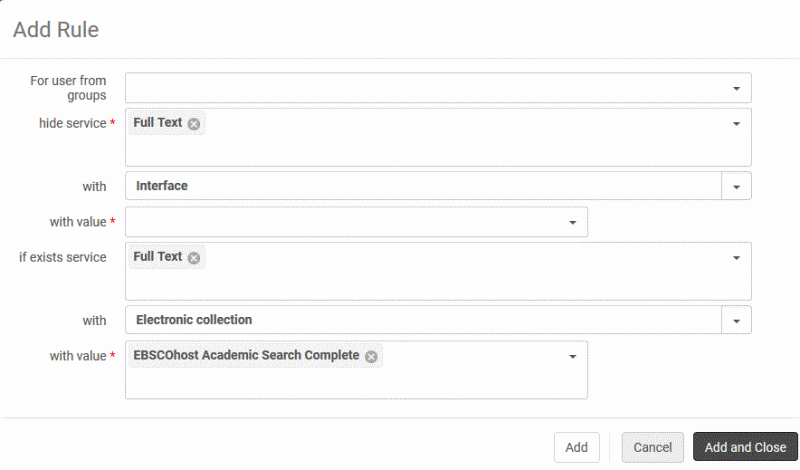
The following selections were made in the screenshot at the right:
- For user from groups field is blank
- hide service* field lists Full Text
- with field lists Interface
- with value* field is blank
- if exists service field lists Full Text
- with field lists Electronic collection
- with value* field lists EBSCOhost Academic Search Complete