
 I-Share
How-To: Prevent an Access Point from Linking to an Authority Record
Question: How do I prevent an access point from automatically linking to an authority record?
Alma's authority control jobs will attempt to automatically link headings in bibliographic records to matching headings in authority records. When a heading is linked, the jobs will update the bibliographic record heading to the preferred form of the heading, as found in the authority record 1XX field.
For various reasons, you may have an access point in a record, especially a name heading (e.g., 100, 110, 600, 700, etc.) that you may not want to link to an authority and not change to the preferred form.
- E.g., the heading is ambiguous and might match to an undifferentiated name heading that you believe is a different person.
- E.g., the record is a brief bib for acquisitions or for a temporary item, and you want the heading to stay in all caps.
Rather than have the heading automatically updated before you are ready to work on it, you want a way to keep the heading unlinked.
Answer
If there is a heading that should remain unlinked from authority records, you may add a subfield 9 to the field with the text "no_linkage." See the image below for an example of a 100 field with subfield 9.
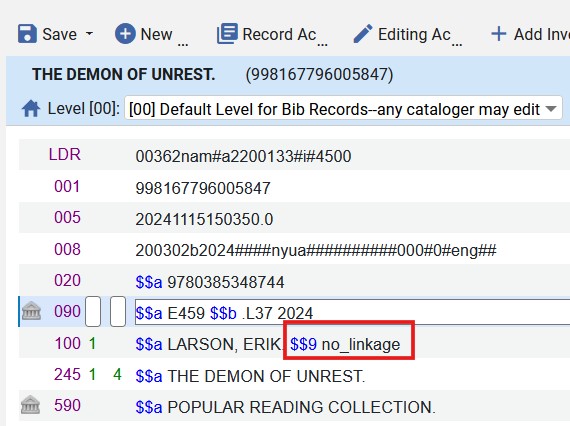
To add the subfield 9 and no_linkage text, you may position the cursor in the heading field, then do one of the following:
- Select the Editing Actions menu, then select Add Subfield. Type 9 after the $$.
- Type the F9 key. Then type 9 after the $$.
Then type no_linkage in lower case with no other punctuation or text.
Additional Resources
Authority Control -- Exclude Heading from Linking. Ex Libris Authority Control Rules. (viewed 11/18/2024)
Updated 11/18/2024