
ProQuest Dissertations & Theses General Electronic Services Configuration
Last edited November 2, 2026.
Overview
This documentation has been developed from a Clarivate case opened and resolved in Fall 2026, with the help of Jack Boettcher, from the Alma Support Team.
The affected I-Share library reported an issue to CARLI. Their patrons were doing searches in EBSCO databases, clicking on the FindIt! button in EBSCO, and the resulting Primo record was not displaying the ProQuest Dissertations and Theses (PQDT) delivery service. The following documentation will show how to resolve this issue in the General Electronic Services (GES) configuration, as well determine how and where the PQDT GES should display in Primo.
Modifying the Service Availability Rules for the PQDT GES
1. In Alma, navigate to Config > Fulfillment > Discovery Interface Display Logic > General Electronic Services. This will bring up a list of all the GES' your institution has configured.
2. From the list find the ProQuest GES and click the more actions menu (symbolized by three ellipses) and select Edit from the drop-down menu.
3. Click on the Service Availability Rules tab to view it.
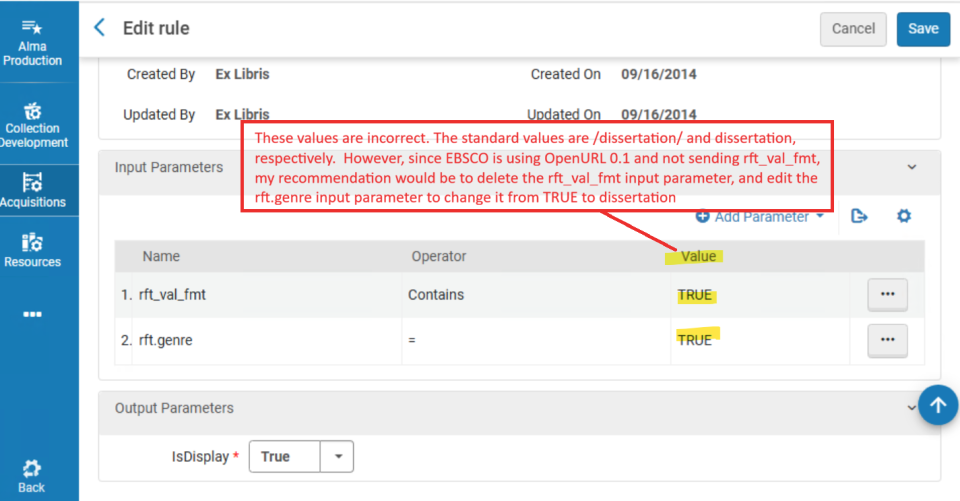
4. If one of your input parameters is: rft_val_fmt, then, you need to delete it. EBSCO is currently using OpenURL 0.1 and this standard does not use the rft_val_fmt input parameter. To delete this, click on the more actions menu (symbolized by three ellipses) and select Delete from the drop-down menu, then click the Save button in the upper right corner.
5. Next, if your input parameter for rft.genre has a value of TRUE, as seen in the image at left, you need to change it to DISSERTATION. After this change, click Save in the upper right.
Making these changes will ensure that the correct parameters for OpenURL 0.1 standard will work effectively when patrons begin their searches in EBSCO and later resolve to Primo. This also applies the following logic:
If rft.genre==dissertation, then, display the GES.
Modifying the Service Details Tab
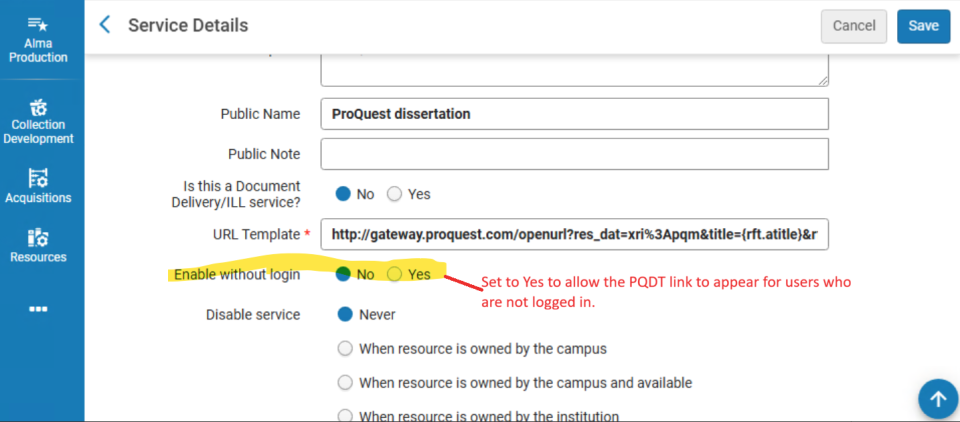
Setting that Determines Whether Users Need to be Logged Into Primo to See Results
1. In Alma, navigate to Config > Fulfillment > Discovery Interface Display Logic > General Electronic Services.
2. From the list find the ProQuest GES and click the more actions menu (symbolized by three ellipses) and select Edit from the drop-down menu.
3. From the Service Details tab, towards the bottom of the screen there is a setting, Enable without login. When this is set to no, this will force patrons to be logged in, in order to see the PQDT delivery service displayed in Primo. When this is set to yes, this will allow anyone viewing the record to see the PQDT delivery service displayed in Primo. If you change the setting, make sure you click Save in the upper right corner to save those changes.
Modifying the URL Template
If you have made the above changes and the error(s) persist, it is possible that the URL template for the GES contains an inaccurate parameter. In the previous image, the URL template contained a parameter: &title={rft.atitle}. This was modified to &title={rft.title} and then click Save in the upper right corner. This is necessary because dissertations do not use article title/atitle. They use title/title.
Determining Where in the Primo Record the Delivery Service Should Display
Lastly, the setting Is this a Document Delivery/ILL service? determines where the PQDT GES delivery service displays in Primo. When no is selected for this setting (like it appears in the image above), the PQDT GES will display in the Links section of the Primo record. When yes is selected for this setting, an additional drop-down for Display Location allows you to choose where to display it:
- Getit & How to Getit
- Viewit & How to Getit
- Getit, Viewit, and How to Getit
- None – No services appear in the record's full display, including the Links section
If you make a change to this setting, be sure to click Save in the upper right after making modifications. More about Primo Delivery Services can be found in the Ex Libris Knowledge Center.