
 I-Share
Alma Electronic Resources Management and OCLC
Last edited December 19, 2025.
Introduction
Audience: This page introduces OCLC products to CARLI Alma I-Share electronic resource library workers. Usually, electronic resources library staff are alerted to problems with their Institution Zones (IZs) communicating with OCLC products due to WorldShare (Interlibrary Loan/ILL) requests for materials the library either cannot lend or no longer has access to.
OCLC products related to Alma Electronic Resources management
- WorldCat- An online database of records cooperatively built from the bibliographic and ownership information of OCLC contributing libraries. WorldCat consists of three major components: bibliographic catalog that includes everything available to library users, a collection manager/knowledge base (KB) that connects library users to electronic content, and a registry of library profiles that allows libraries to maintain information about their services.
- WorldShare Collection Manager- OCLC cataloging tool, collections controller and knowledge base (KB) that helps libraries streamline and automate the management of bibliographic records for their electronic and print collections in one place, while improving collection discovery and access.
- WorldShare (ILL)- Service that enables OCLC libraries to borrow and lend materials quickly and securely. It facilitates creating, sending, managing, and tracking loan requests and document orders.
- OCLC Data Syncs- An automated service in Collection Manager that allows synchronization of local holdings with WorldCat to make collections visible and available through OCLC services. The service adds original records to WorldCat, enhances and matches local library records with existing WorldCat records, manages local holdings data, creates or deletes holdings, and also updates local bibliographic data.
NOTE: OCLC Data Syncs themselves only set the libraries holdings as yes or no. See section below, Does OCLC WorldCat and WorldShare ILL know what date range a library has access to for electronic titles? for more details.
Definitions based on entries in OCLC Glossary.
How do the various OCLC products communicate and relate to CARLI I-Share Alma?
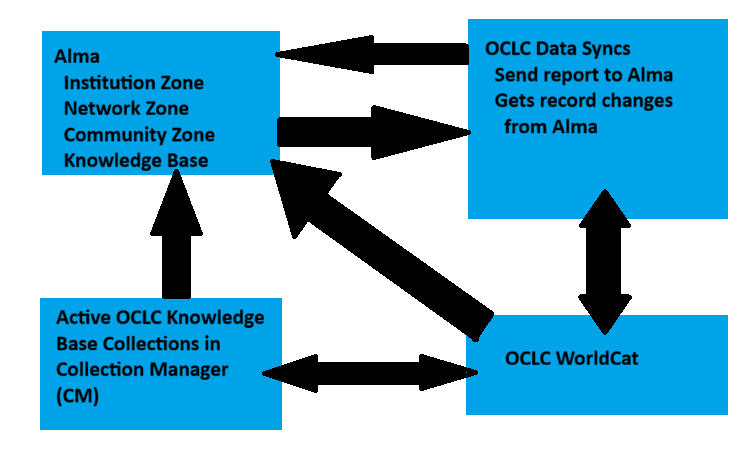
conceptual map showing inter-relationships
The Concept Map is pictured at the right and shows the following inter-relationships between Alma, OCLC Data Syncs, Collection Manager, and WorldCat.
Note one-way relationships:
• OCLC WorldCat can send bib records to Alma via an import.
• WorldShare OCLC Collection Manager can send bib records & portfolios/holdings to Alma (requires set-up).
• Alma sends changes in bib records & their holdings to WorldCat from Alma via OCLC Data Syncs.
• Report on how changes are processed goes from OCLC WorldCat to Alma via the OCLC Data Syncs.
Note two-way relationships:
• Records can go to OCLC WorldCat from Collection Manager and vice versa.
Where does the OCLC WorldShare/Interlibrary Loan (ILL) part fit?
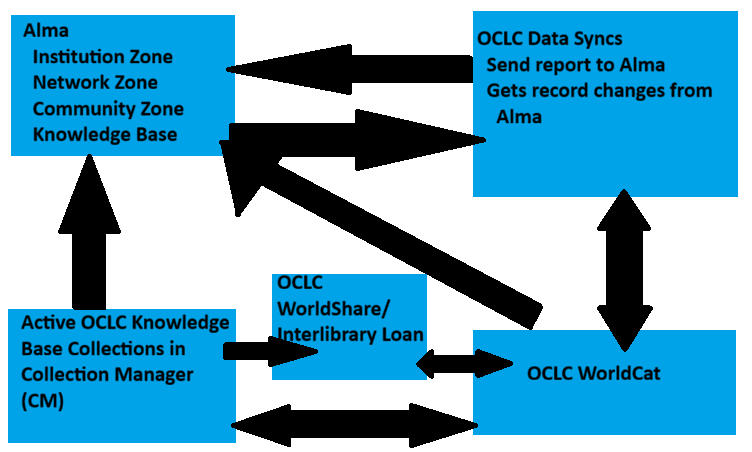
conceptual map showing inter-relationships
No relationship:
- WorldShare ILL does not communicate with your Alma IZ.
One-way relationship:
- CARLI I-Share OCLC Data Syncs are set up to run daily for physical materials and weekly for electronic resources.
Two-way relationship:
- WorldShare ILL uses WorldCat holdings details to determine if your library may receive an ILL request.
Why should you do OCLC Data Syncs?
A core value of librarianship is sharing resources and communicating what physical and electronic resources your library collects.
How to check your OCLC Data Sync reports in your Alma IZ?
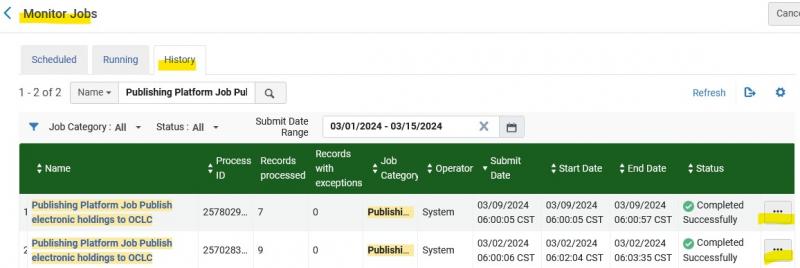
In Alma, go to Admin > Monitor Jobs > History tab. Search for Publishing Platform Job Publish electronic holdings to OCLC in the Name field (if Name is not selected, click on the drop-down menu and select it). The screenshot below shows the Monitor Jobs queue and History tab, when doing a search by Name with the keywords: Publishing Platform Job Publish electronic holdings to OCLC.
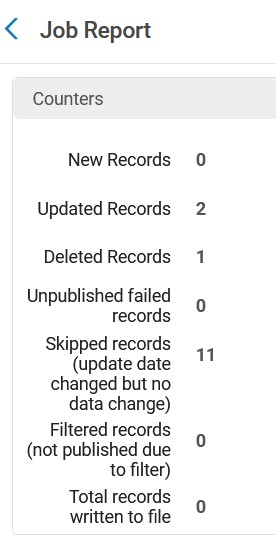
Click on the three ellipses/More Actions menu to the right of the report you want to look at details for and select Report from the drop-down menu. The image that follows is an example of a Job Report. It shows Counters for New Records, Updated Records, Deleted Records, Unpublished failed records, Skipped records, Filtered records, and Total records.
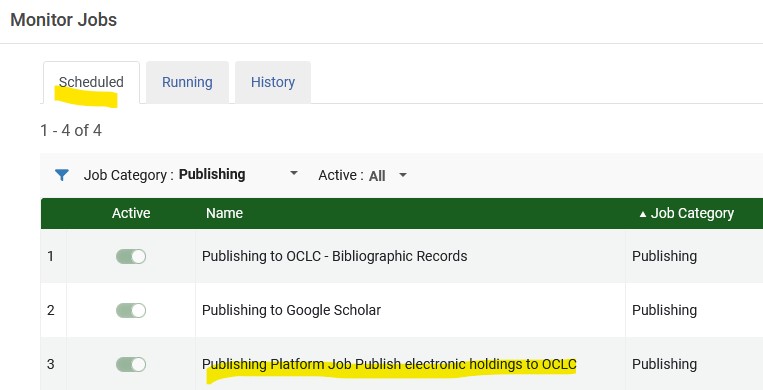
You can also see details about the scheduled job if you click on the Scheduled tab when in Admin > Monitor Jobs > Scheduled tab, then select Publishing from the Job Category drop-down menu. The Publishing Platform Job Publish electronic holdings to OCLC report will be one of the scheduled jobs to display.
How to Check Data Sync Reports in OCLC?
carli documentation
OCLC Data Sync Reports CARLI on Data Syncs/Automatic Holdings Updates
What is sent to e-resource data syncs from the Alma IZ for I-Share libraries?
I-Share libraries have a preset definition for the e-resources set sent to WorldCat. Most have not changed the definition that was set up during the 2020 Alma migration. See your IZ's e-resources general publishing profile for the exact definition of the set. Visit Defining Electronic Title Sets for OCLC Data Sync page for details. Contact the CARLI Support to request an explanation of your library's definition of the set of electronic titles sent to the OCLC Data Sync.
Are e-resources bibliographic records with no OCLC number match processed by the data sync?
The processing that does happen depends on data sync settings and defined matching options. If a record is unmatched, it will go to the OCLC staging area until the library takes action or the staging period expires. Check the Alma data sync reports regularly to know when to check the OCLC staging area.
Can we set the ILL availability for WorldShare ILL in Collection Manager (CM)?
Yes, CARLI recommends that libraries manage electronic collections directly in WorldShare Collection Manager. In each active WorldShare CM Knowledge Base (KB) Collection there are settings for making items eligible or ineligible for WorldShare/ILL.
Library staff should select and activate KB collections in Collection Manager, then modify contents as needed, and set the ILL allowed parameter to No or Yes.
If the library has created a custom KB collection that may be populated from a data sync publishing job, then set the ILL allowed parameter to No or Yes.
Library staff set a collection eligible/yes for ILL or not eligible/no depending on these variables:
• types of e-resources, for example: Streaming videos or Audio files (which by their nature are not loanable)
• licenses allowing or restricting ILL in part or entirely
Does OCLC WorldCat and WorldShare ILL know what date range a library has access to for electronic titles?
No. WorldCat has just the library's holding symbol attached to an e-title. There's no information from the Data Sync itself about what years or volumes a library can access.
Libraries may provide coverage ranges via:
- The library sends date and volume ranges via OCLC local holding records (LHRs) data loading process.
- If the library manages KB collections in OCLC Collection Manager and the e-collection includes date ranges for e-serials collections from a particular vendor. Libraries may modify these manually or with Knowledge Bases and Related Tools (KBART) file updates, if their subscribed coverage is different.
Additional OCLC Documentation
Create a Local Holdings Records Collection
How do I synchronize holdings between Alma and WorldCat?
Information on Data Sync reports on bibliographic changes and WorldCat holdings.
What are configure institution settings for local holdings records collections?